Lemhi Release — Fort Mandan, MO (July 1st, 2026)

What's New: June 2026
Fort Mandan release: the expedition's first winter camp, where the Corps met Sacagawea and prepared for the unknown terrain ahead.
Lemhi used to start working the day a prospect signed. Now it starts before they do. Point it at any company's domain and it builds a complete AI readiness report on their posture, so you walk into the first meeting already knowing where the risk and the opportunity sit, no contract required. Once they're a client, that same depth follows them: SharePoint exposure broken down site by site, the gap between the sensitivity labels they bought and the ones they actually use, a live read on which AI apps people open and which agents they've spun up on their own, and every report ready to leave Lemhi as clean Markdown or an editable PowerPoint you present as your own.
Sell Before You Sign: Prospect AI Readiness Reports
Turn a prospect’s domain into a sales conversation. You can build a complete AI readiness report on a prospect you don't manage yet, then use it to open the relationship (or reignite interest with existing customers). The result is net-new prospecting collateral that puts you in the room with a point of view nobody else has. The report covers what the best AI forward companies are doing in their industry, AI risks, and suggested quick wins to get AI momentum.
A full report from just a domain: Enter a prospect's domain and Lemhi produces a complete AI readiness report on their public posture, surfaced in an AI Intel report. Every report is a prospecting asset you build before the first call, not homework you do after the close.
Ask the report questions: A built-in Q&A chat answers plain-language questions about the report, so you walk into a specific meeting prepped without re-reading the whole thing.
Edit before you send: Tighten or tailor any section inline before the report reaches a prospect, so the version they see sounds like you.
Know the moment a report is ready: The "AI Impact report ready" notification email now includes the client name and a direct link, so you act on the right report without hunting for it.
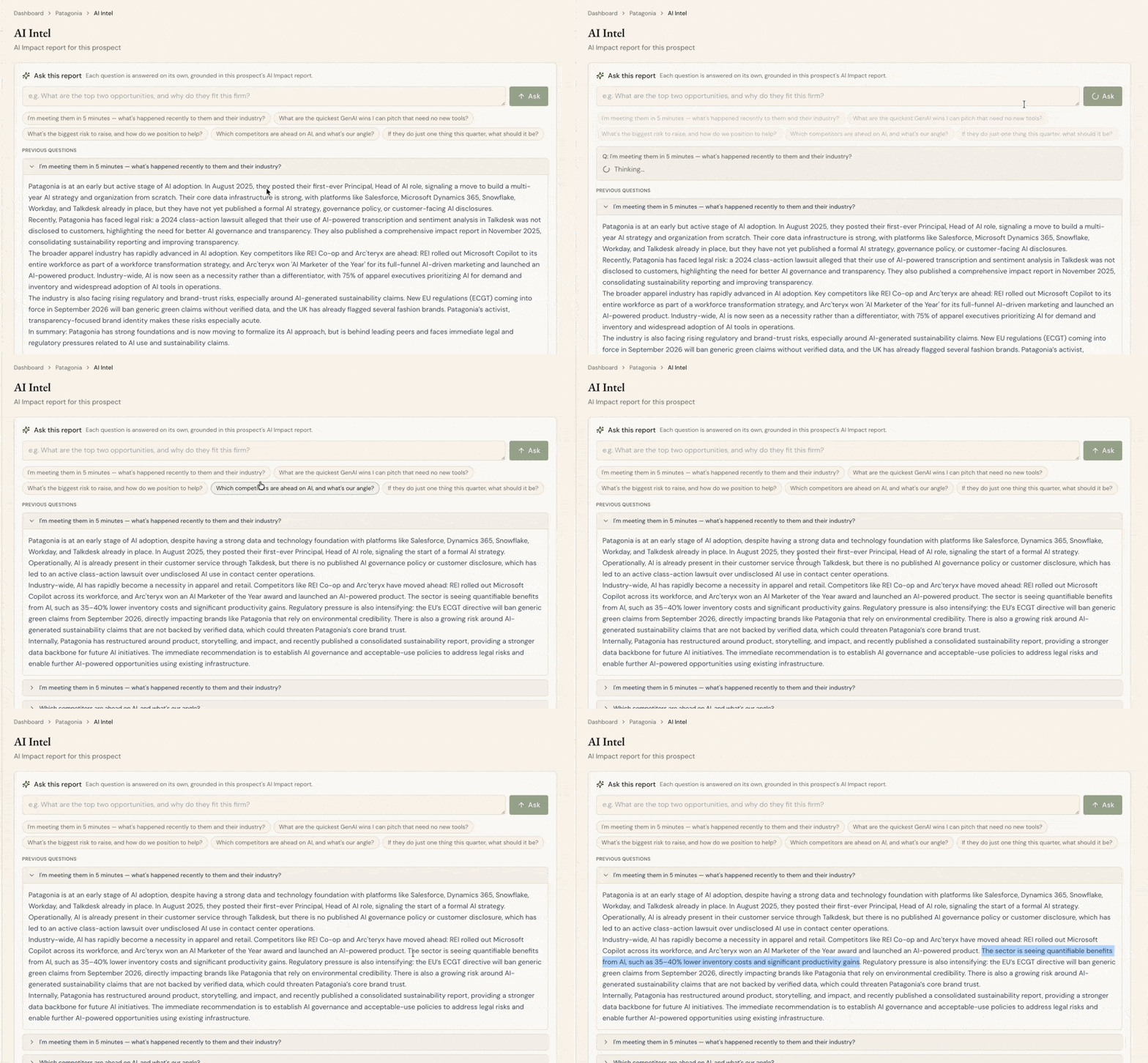
AI Intel - a generated Prospect AI Readiness Report with the Q&A chat panel
AI Data Governance: See Exposure Site by Site
Lead the remediation conversation with the exact sites that matter. The Data Governance Dashboard moves past the aggregate posture into the per-site detail you need to make the case for a project.
Per-site SharePoint detail: Drill into each SharePoint site to see live sharing across internal, external, anonymous, and org-wide access, plus owner and member counts. The riskiest sites become obvious instead of getting buried in a tenant-wide average. That's the difference between "you have exposure somewhere" and "fix these three sites first."
Sensitivity-label coverage: A new control compares how many sensitivity labels exist against how many are actually applied, so you can show a client the gap between the labels they bought and the labels they use, then scope the work to close it.
Stale Content reflects real human use: The Stale Content signal now measures genuine human activity instead of counting backup jobs as use, so "abandoned" sites get flagged accurately and you don't burn credibility chasing false positives.
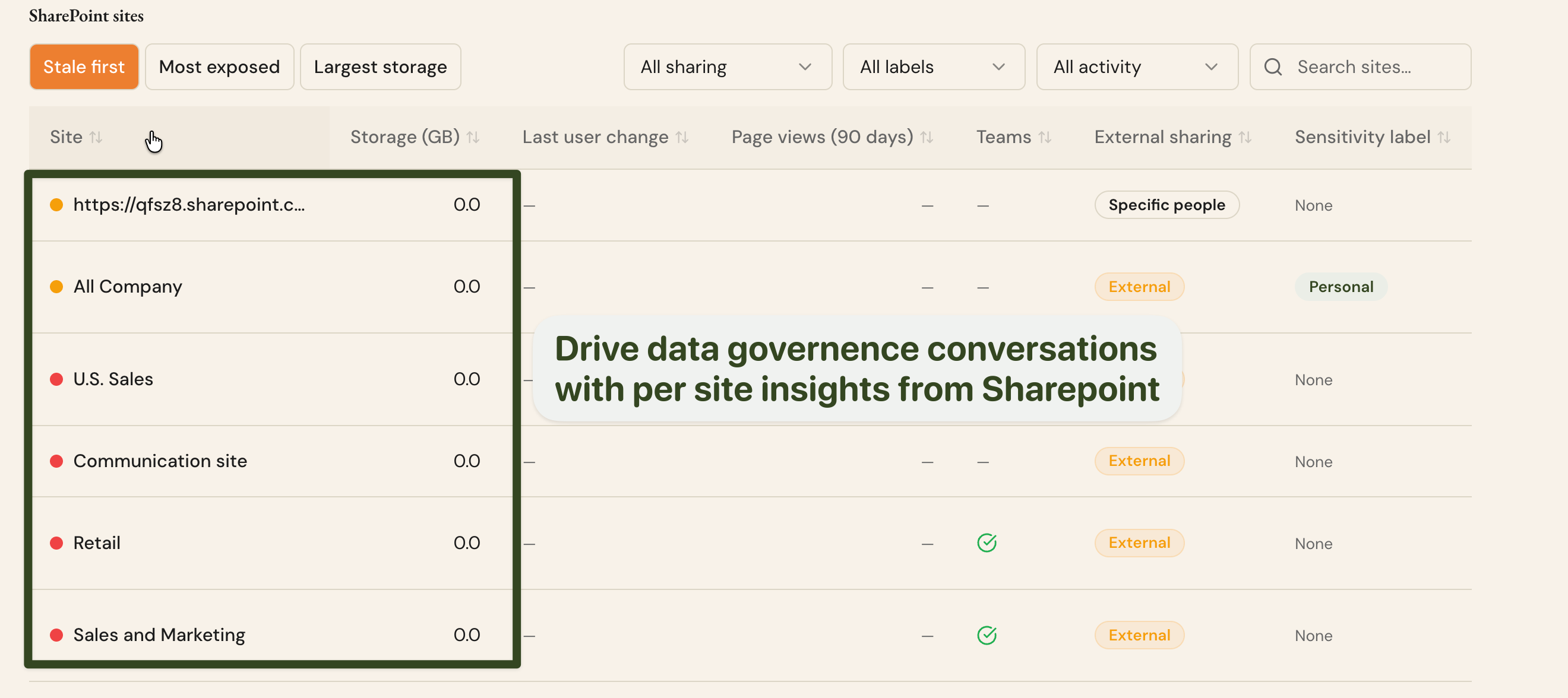
AI Data Governance - per-site SharePoint detail table with sharing breakdown and sensitivity-label coverage
AI Observability: What's Actually in Use
Move from "who has a license" to "which apps people open and which agents they've built." Real behavior gives you an adoption and governance story you can put on screen without asking the client to self-report.
Adoption by app: A new live view shows which AI apps are actually being used in a client's tenant, with no ingestion or setup required, so you ground the adoption conversation in what people do instead of what they're licensed for.
See every AI agent in a client's tenant: A new live inventory lists the AI agents people have built inside a client's Microsoft environment: which agents exist, who owns them, and what each one connects to and can access. It reads live with no setup or ingestion, so you walk into a governance conversation with a real inventory of shadow AI instead of a guess.
A Copilot dashboard built for multiple providers: The Copilot view was reworked into a multi-provider layout, so Copilot and Claude usage sit side by side as you add coverage and the QBR keeps reading clean as the picture grows.
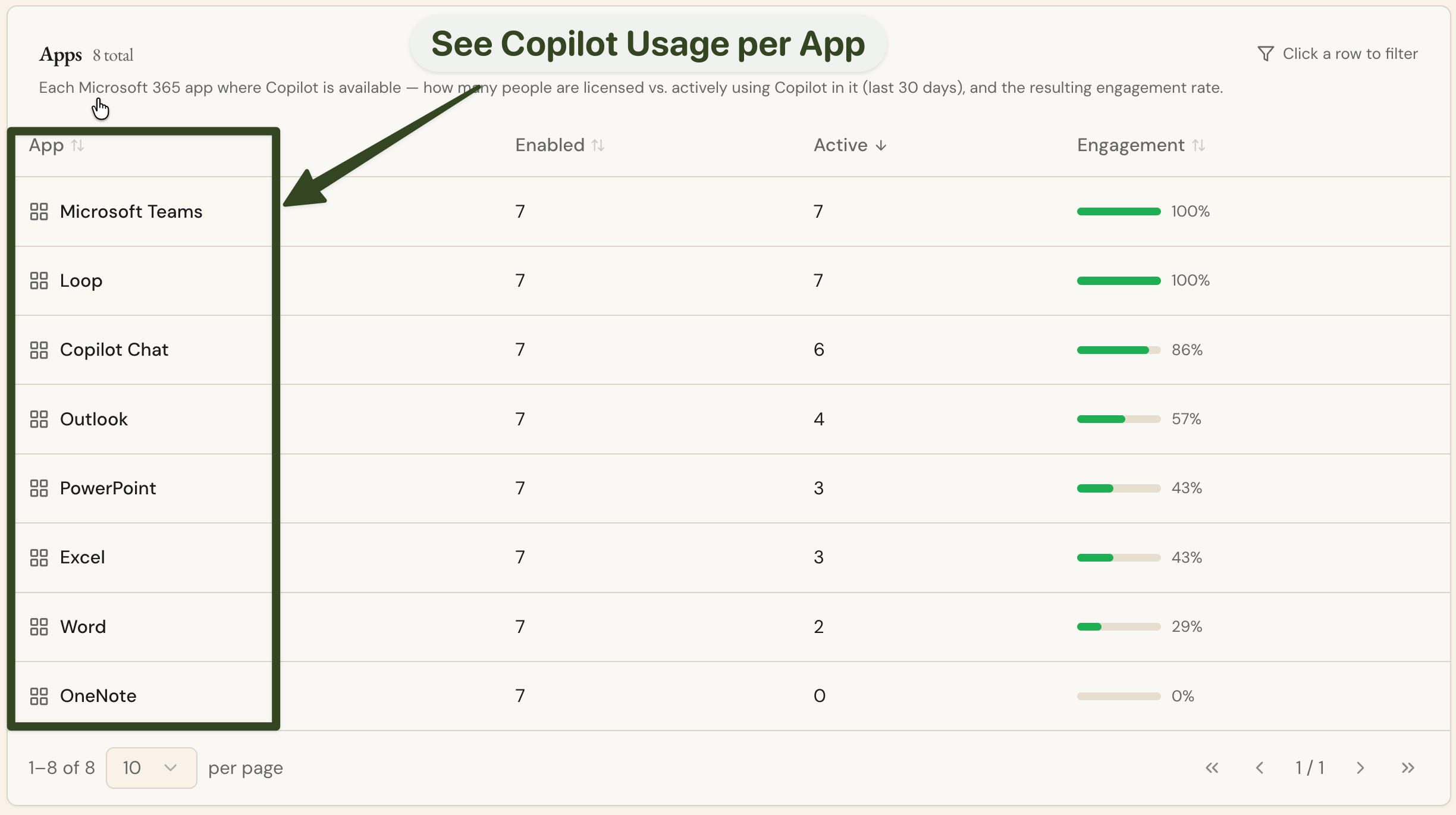
AI Observability - Adoption-by-app view
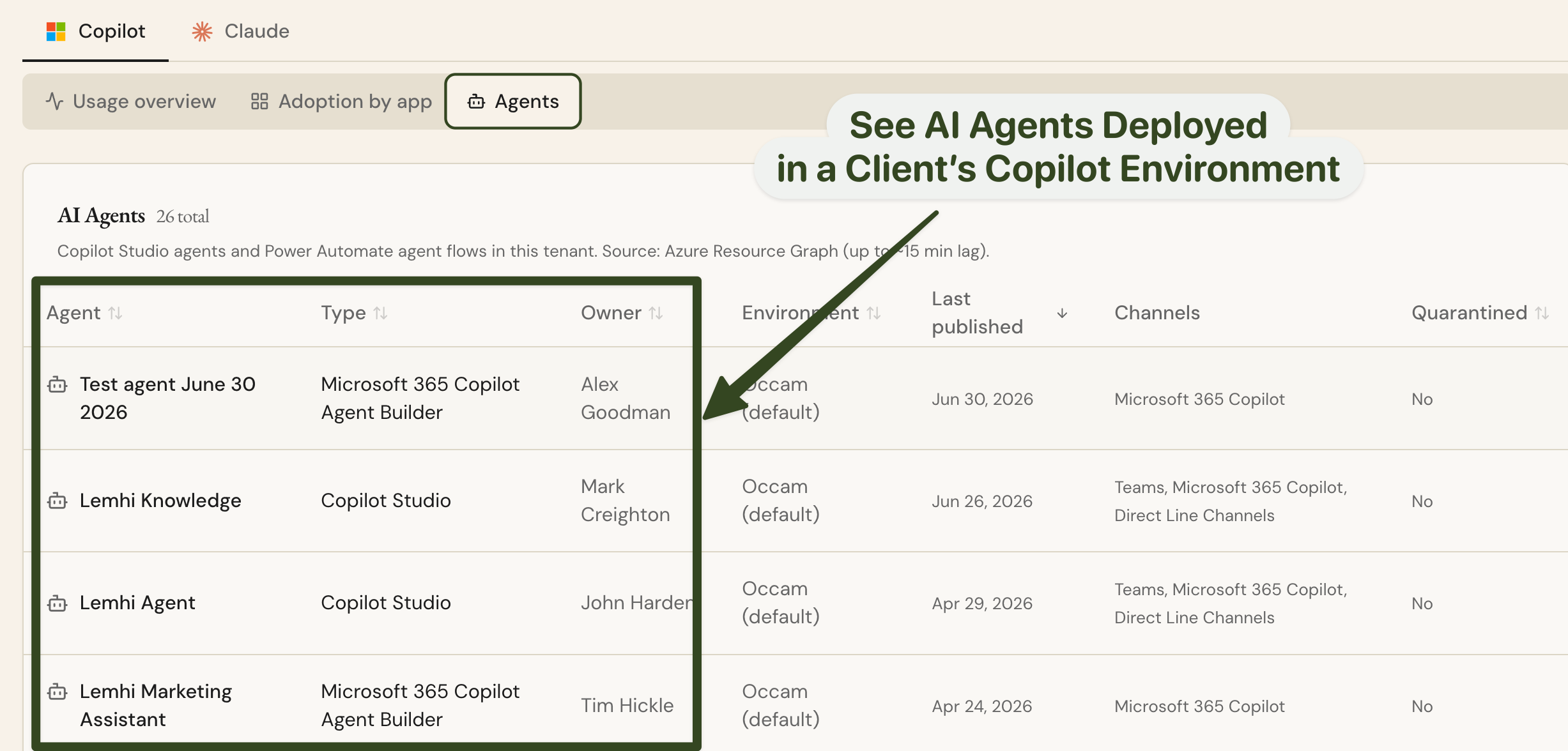
AI Observability - Copilot Agents inventory view with owner, connections, and access per agent
Client Deliverables & Branding
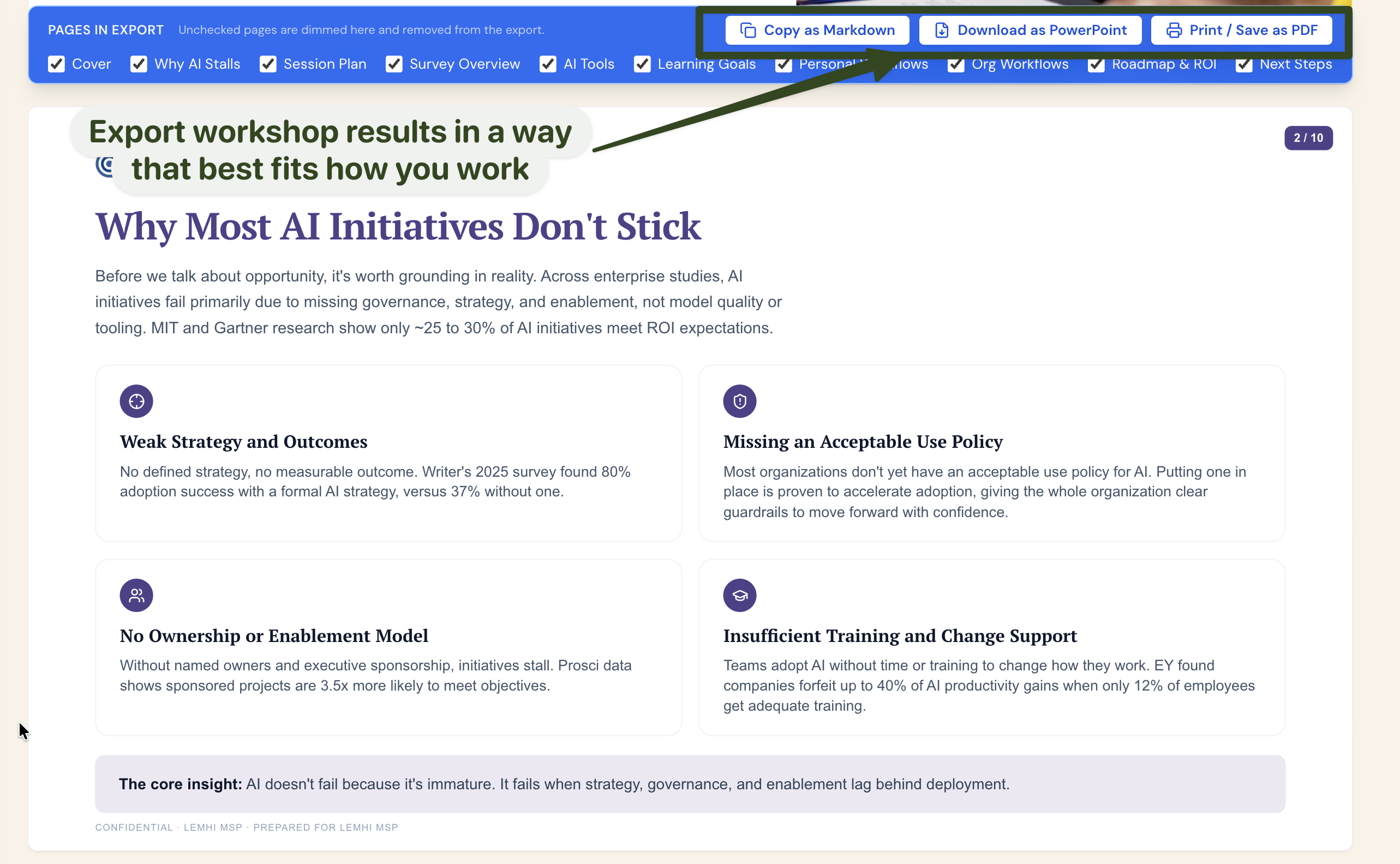
The AI Enablement Workshop deck now renders as branded HTML with a PDF export built into Lemhi, so the deck you present and hand off carries your brand and lives in one place.
Download the workshop deck as PowerPoint: The AI Enablement Workshop deck now exports as an editable .pptx alongside the fixed PDF. Reorder slides, trim them, or fold them into your own deck and present the workshop as your own.
Copy any report as Markdown: The AI Intel report, Executive Summary, and Workshop deck each get a one-click "Copy as Markdown" that respects whatever sections you've toggled off, so you can drop report text straight into a client email, a doc, or your own AI tools without retyping or screenshotting.
Bug Fixes & Minor Improvements
Fix a bad time-savings estimate without a resubmit: Admins can now edit the time-savings numbers on an individual survey response inline, so one fat-fingered entry no longer skews the ROI story. Correct the value once and it flows straight into the downstream ROI math.
Export individual survey results: Download per-respondent results from the AI Workshop Results page as a CSV, so you can slice the raw responses outside the app.
Cleaner multi-value exports: Values inside multi-select cells in the survey results CSV now export alphabetized, so the file stays consistent and easy to compare across respondents.
AI Planner and dashboard polish: A round of UI improvements across the AI Planner and dashboard makes the planning surface cleaner to work in.
Fixed the survey hours tab dropping a custom time-savings value when a respondent navigated back and then returned to the tab
Fixed duplicate client records being created on M365 import, and made survey auto-create aware of a client's M365 domains so the same client isn't created twice
Fixed horizontal use cases showing "Use Case No Longer Exists" on Top Picks, the response detail view, and the ROI rollout
Fixed a "Something went wrong" flash that briefly appeared right after a new version was deployed